Sidekick
Sidekick is the AI assistant built into Luna Park. It reads your project, creates and edits files (pages, components, routes, databases, stores...), and tests what it builds.
Open Sidekick
- Press
Ctrl + Shift + X; - or press
Shifttwice to open the Navigator, thenS; - or click the Sidekick AI button in the top bar, then Open Sidekick.
Sidekick opens as a resizable workspace on the right of the editor. Its header lets you start a New chat, browse the Conversation history, and close the panel.
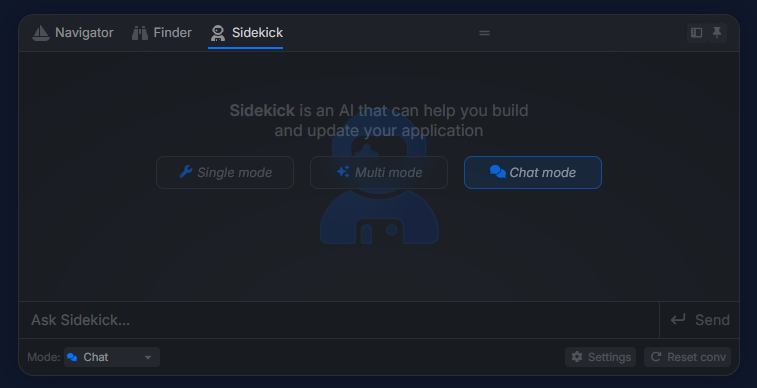
Modes
Pick a mode from the dropdown next to the prompt:
| Mode | What Sidekick does |
|---|---|
| Build | Chats with you and makes changes to your application. |
| Plan | Explores your application and proposes a plan before changing anything. |
| Review | Inspects your application and gives suggestions without making changes. |
Type @ in the prompt to mention a file. Click Stop Sidekick to interrupt a run.
While it works, Sidekick shows its reasoning, the diff of each change, and may ask you questions through a small form.
What Sidekick can do
In every mode, Sidekick can read the file tree, search files, list nodes, components, tokens, and plugins, and read the Luna Park documentation.
In Build mode, it can also:
- create and edit files, and update design tokens;
- run routes to test the backend. Database changes are always rolled back;
- interact with the live preview like a user (click, fill inputs, read values). Cookies and database changes are rolled back.
Generate values
Data forms (default values, table rows...) have a Generate button that fills values with AI.
Configure a provider
Open the Sidekick AI button in the top bar. Under Hosted providers:
- Select the provider.
- Pick the model.
- Enter your
API Key(and theAPI URLwhen needed).
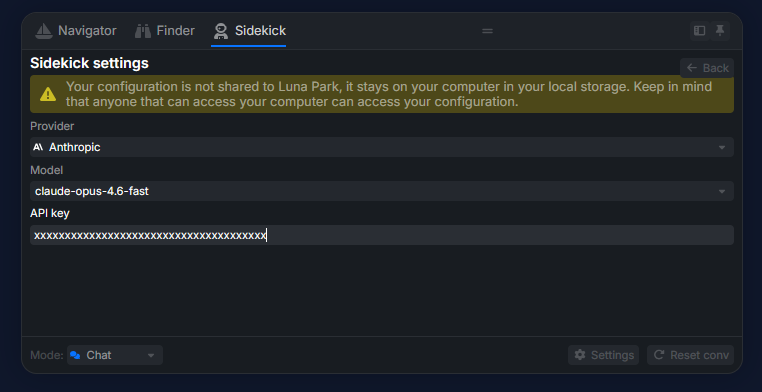
Supported hosted providers:
| Provider | Notes |
|---|---|
| Mistral | Default provider. |
| Gemini | |
| Anthropic | |
| OpenAI | Enter any model name. |
| OpenRouter | Enter any model name. |
| OpenAI compatible | Any server exposing an OpenAI-compatible API. Needs a URL; the key is optional. |
Privacy
Credentials are stored in your browser and only sent to the selected provider.
Desktop only: local models and agents
The desktop app adds two sections to the Sidekick settings.
Local models
Luna Park detects Ollama and LM Studio running on your machine. You can also enter a custom URL. In Build mode, the model must support tool calling.
Local agents
Sidekick can delegate the work to a coding agent installed on your machine, with its existing configuration: Claude, Codex, Gemini CLI, Mistral Vibe, and other agents compatible with the Agent Client Protocol (ACP). More agents can be installed from the ACP registry, and you can add a custom one (name, command, arguments, environment).
Each agent has its own Model, effort, and Permissions options. Luna Park gives the agent access to its MCP server automatically (see AI Agents).