Custom Logic Nodes
You can create custom logic nodes to extend Luna Park's visual scripting editor.
Function Nodes
Function nodes are designed for complex operations or asynchronous tasks (promises). They require an input execution anchor (in_exec) and are evaluated only when triggered.
Example:
import { LogicType, makeLogicNode } from "@luna-park/plugin";

export const myFunctionNode = makeLogicNode({
    name: "function-node",
    inputs: {
        in_exec: LogicType.exec(),
        in_a: LogicType.number({name: "A"}),
        in_b: LogicType.number({name: "B"})
    },
    outputs: {
        out_exec: LogicType.exec(),
        out_result: LogicType.number({name: "A+B"})
    },
    methods: {
        async in_exec() {
            this.out_result = this.in_a + this.in_b;
            await this.out_exec();
        }
    },
    display: {
        name: "My Function Node"
    },
});
INFO
Note that every input key must start with in_, and every output key must start with out_. The default input and output execution thread anchors are in_exec and out_exec.
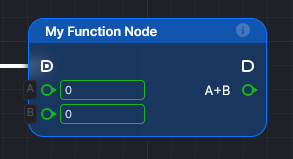
This node will be displayed like this:
Operation Nodes
Operation nodes are used for simple, synchronous logic operations. They do not require an input execution anchor and are evaluated on demand.
Example:
import { LogicType, makeLogicNode } from "@luna-park/plugin";

export const myOperationNode = makeLogicNode({
    name: "operation-node",
    inputs: {
        in_a: LogicType.number({ name: "A" }),
        in_b: LogicType.number({ name: "B" })
    },
    outputs: {
        out_result: LogicType.number({ name: "A+B" })
    },
    methods: {
        compute() {
             this.out_result = this.in_a + this.in_b;
        }
    },
    display: {
        name: "My Operation Node"
    }
});
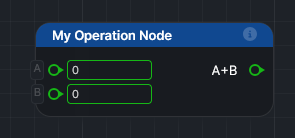
This node will be displayed like this:
Registering nodes
Add your nodes to the plugin's editor.nodes:
makePlugin({
    /* ... */
    editor: {
        nodes: [myFunctionNode, myOperationNode]
    }
});
Like the other options, nodes can be a function receiving the environment, to generate nodes from the plugin's configuration.
Scope and documentation
display.config.scope restricts where the node can be used: ELogicScope.Frontend, ELogicScope.Backend, or ELogicScope.Shared. A backend node, for example, only appears in routes, crons, and backend scripts.
documentation.description is shown in the editor and given to Sidekick and AI agents.
import { ELogicScope, LogicType, makeLogicNode } from "@luna-park/plugin";

export const sendNode = makeLogicNode({
    name: "my-plugin/send",
    /* inputs, outputs, methods */
    display: {
        name: "Send",
        config: { scope: ELogicScope.Backend }
    },
    documentation: {
        description: "Send a message to the service."
    }
});
Compiled code
When the app is compiled, the node's method is copied into the generated code. It must therefore be self-contained: it can't use variables or imports from your plugin file.
To call your own code instead, provide build:
generate: returns the code of the method, as a string;imports: the functions to import in the generated file, with the package they come from.
makeLogicNode({
    /* ... */
    build: {
        generate: () => `async function () {
            this.out_result = await send(this.in_message);
            await this.out_exec();
        }`,
        imports: [{ name: "send", target: "my-plugin/server" }]
    }
});
The imported package must be added to the app's dependencies with build.frontImports or build.backImports (see Backend and Build).