Plugins
A plugin adds new components, logic nodes, design tokens, route guards, or integrations with external services to Luna Park.
Unlike a regular NPM package, a plugin is built specifically for Luna Park: what it exposes plugs directly into the editor (components in the palette, nodes in the graph, tokens in the style panel, settings in the top bar) and into the exported app.
Install a plugin
Open Libraries in the top bar, then Install plugins. The Plugins tab searches the available plugins; the Installed tab lists the project's plugins.
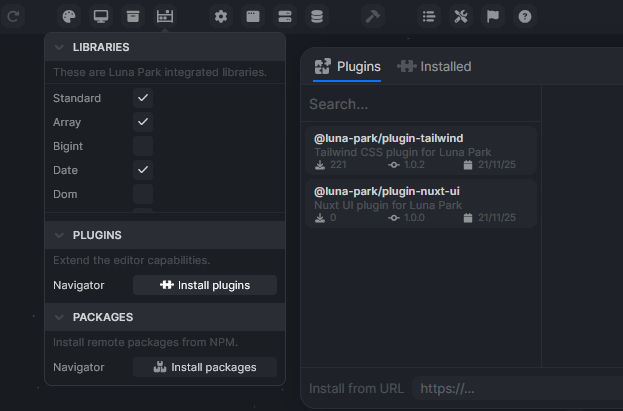
Select a plugin and click Install plugin.
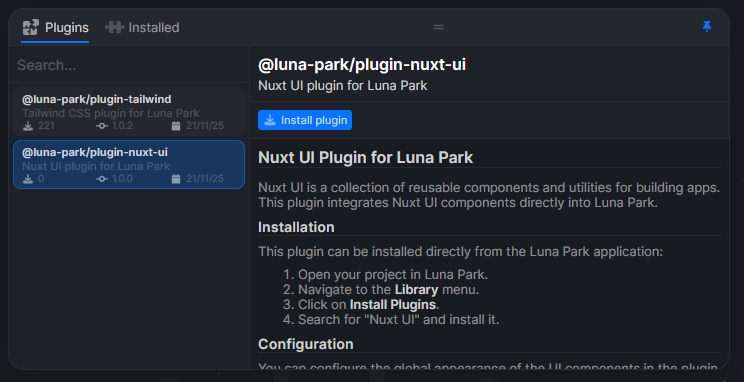
Installing a plugin outside the @luna-park/ scope asks for confirmation: a plugin runs code in the editor and in your app, so only install plugins you trust.
Install from a URL
To install a plugin that is not published (a plugin you are developing, for example), paste its URL in the Install from URL field at the bottom of the plugins panel.
Configure a plugin
Each installed plugin adds a button to the top bar. It opens the plugin's Config form and its Settings tabs.
Official plugins
Ferris Wheel
@ferris-wheel/plugin
Luna Park's design system. Provides the base component library and design tokens, and generates color variants from its configuration (primary and content colors, border and radius, light/dark/auto theme). Preinstalled in the Ferris Wheel and Frontend project templates.
Nuxt UI
@luna-park/plugin-nuxt-ui
Integrates the Nuxt UI component collection into Luna Park: chat, dashboard, data, forms, navigation, overlays, layout. Configurable from the plugin settings (primary color, neutral color, light/dark/auto mode, global border radius).
Tailwind
@luna-park/plugin-tailwind
Enables Tailwind CSS classes in the Classes field of components.
Users
@luna-park/plugin-users
User accounts: sign-up, sign-in, sessions, OAuth2 (Google, GitHub, Discord, Microsoft, GitLab...), and roles with permissions. Adds route guards and dedicated nodes. See Authentication.
Mail
@luna-park/plugin-mail
Sends emails from the backend through any SMTP server (Gmail, Mailgun, Postmark, Amazon SES, Brevo...). Configure the host, port, TLS, credentials, and default sender in its SMTP settings, then use the mail/send node in backend logic. In the editor, emails are logged to the console instead of being sent. The SMTP password goes to the exported app's .env file as MAIL_SMTP_PASSWORD.
Build your own plugin
If you're comfortable with TypeScript (and Vue for components), you can write your own plugins. See Develop a plugin.