Plugin basics
The @luna-park/plugin package provides the tools needed to create plugins. It also re-exports LogicType, makeLogicNode, and the Luna Park types.
A plugin exports an object defined with makePlugin:
import { makePlugin } from '@luna-park/plugin';
import myIcon from './my-icon.svg';

export default makePlugin({
    id: 'my-plugin',
    name: 'My Plugin',
    icon: myIcon,
    description: 'What my plugin does.'
});
Required properties:
id: unique identifier across all plugins.name: display name.icon: URL string or SVG string.
Optional metadata: description, color, and llm (instructions given to Sidekick and AI agents on how to use your plugin).
Overview
| Property | Description |
|---|---|
config | Configuration form, see below. |
internals | Hidden plugin state, see below. |
settings | Custom settings tabs, see below. |
lifecycle | mount, update, and unmount hooks. |
inject | CSS or JavaScript injected into the editor. |
windows | Standalone windows, see below. |
editor.components | Custom components. |
editor.wrapper | A component wrapping the whole app, see Custom components. |
editor.nodes | Custom logic nodes. |
editor.tokens | Design tokens. |
editor.templates | Templates. |
editor.guards | Route guards. |
hooks | Backend and database hooks. |
build | Dependencies, environment variables, and code injections for the compiled app. |
Configuration
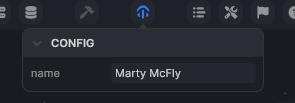
The config property defines a form displayed in the plugin's top bar button (Config). Values are saved with the project.
config is a LogicType (see Typing).
makePlugin({
    /* ... */
    config: LogicType.object({
        name: LogicType.string({ default: "Marty McFly" })
    })
});
The config object is available in hooks and option functions (e.g. config.name).
Internal state
internals stores plugin data that is not exposed in the configuration form. A default value is required.
makePlugin({
    /* ... */
    internals: {
        tutorial: true
    }
});
Available like config in hooks and option functions (e.g. internals.tutorial). It is saved with the project.
Option format
The editor, build, and inject options accept either:
- a direct value,
- a function that returns the value (can be asynchronous).
When a function is used, it receives the plugin environment:
| Property | Description |
|---|---|
config | The current configuration. |
internals | The current internal state. |
mode | build or editor, depending on the environment. |
app | The project's application. |
getFile(id) | Reads a file of the project. |
addFile(file, parentId?) | Adds a file to the project (a database, a store...). |
log(message, severity?) | Writes to the editor console. |
backend.cookies | The cookies of the editor's backend. |
The same environment is passed to the lifecycle hooks.
Lifecycle hooks
Mount
Called when the plugin is mounted in the editor (installation or project load). This is the place to create the files your plugin needs, with addFile.
makePlugin({
    lifecycle: {
        mount: ({ app, addFile }) => { console.log("Plugin mounted!") }
    }
});
Unmount
Called when the plugin is uninstalled.
makePlugin({
    lifecycle: {
        unmount: () => { console.log("Goodbye!") }
    }
});
Update
Called on every plugin configuration update.
makePlugin({
    lifecycle: {
        update: ({ config }) => { console.log("New config:", config) }
    }
});
Injections
inject injects CSS or JavaScript into the editor:
makePlugin({
    inject: {
        css: `#app { background-color: red; }`,
        js: `alert("Hey!");`
    }
});
Each entry can be a string or a function that returns a string. To inject code into the compiled app, use build.injections.
Settings tabs
For settings that a form can't express, add your own Vue components as tabs of the plugin's Settings:
import { shallowRef } from 'vue';
import { faGear } from '@fortawesome/pro-solid-svg-icons';
import MySettings from './MySettings.vue';

makePlugin({
    settings: [
        { label: 'General', icon: faGear, component: shallowRef(MySettings) }
    ]
});
Custom windows
A plugin can provide standalone pages, opened in a separate browser window (an OAuth callback, a tool...). Declare them in windows:
import MyWindow from './MyWindow.vue';

makePlugin({
    windows: {
        MyWindow
    }
});
A window is reachable at https://luna-park.app/plugin?plugin=<package>&window=<name>, for example with window.open(). Windows of plugins outside @luna-park/ ask for confirmation before loading.
Templates
A plugin can provide ready-made layout blocks. They appear in the Templates tab of the editor's bottom panel, and users drag them into their layouts.
makePlugin({
    editor: {
        templates: [
            {
                name: 'Login form',
                preview: 'https://example.com/preview.png',
                template: loginFormFile
            }
        ]
    }
});
template is a component file in the Luna Park project format, and preview an optional image URL.
INFO
Components, logic nodes, tokens, and backend features are covered in the following pages.